Showing posts with label Blogger. Show all posts

Monday, May 19, 2014

How to Optimize Blog Labels, Archives and Comments in Blogger for SEO ranking

0 comments
The Search-Engines like Google are on the fast way to detect anything existed in a site that is having something non-appropriate to be indexed, in this case the only page doesn't face the problems, But the whole site gets added in the black list of sites.


Therefore, Before you come to enter in the Online World with your work that you like to do, in this state of interest you've to be adjusted withing the rules made by search-engines which may bring you success in every step you take there by.


Monday, July 29, 2013

How to Optimize Post Titles and Headings in Blogger for Better Search-Results

0 comments
The importance for coding is something you really love to do, In which sometime we interact with Robots.txt file and on the other hand we do some SEO in order to achieve the goals we've intended for.


However, In the article I've brought a very important thing from the world of SEO that is setting up"Post Titles and Headings" in the appropriate way to prevent low rank in search results.

How to Enable Blog and Each Post Meta Description in Blogger for High Ranks

0 comments
I know you were probably looking for the ways to optimize your website/blog in the terms of SEO since a time. Making a positive decision about what you do, always goes forward in all ways you opted out.


Therefore, In the article I've brought one of most essential things for bloggers to apply for optimizing their sites/blogs in SEO, You know having something on hands is better than nothing So Don't let it go just apply it today. 

How to enable Custom Robots Header Tags in Blogger for Better SEO

0 comments
In the modern era every On-Line particle is getting hard to confront, as well as the online stakeholders like Search-Engines in which specially Google is going more forward while letting others so far behind in the terms of service providing. 


This Point can't be ignored that Google is providing much facilities to the users in an equal way, Mean to equal is that there is no grade given to each user separately. We know Blogger is also one of products of Google, Thus in today's post I'll mention something concerning Blogger.

Sunday, July 28, 2013

How to Create Custom Robots.txt File in Advance SEO For Blogger

0 comments
Basically, The work we do in this is to make a structure (according to your desire) and put it into your blog thus the structure will tell the crawlers, how to index my contents over the Search-Engines.


Actually, In the article you'll be able to learn the Robots.txt file usage in the fully understandable manner that works for your blog in the terms of crawlers and indexation. The particles we prevent to be indexed can be the followings such as (Labels, Archives and other Temporary links).

Thursday, July 25, 2013

How to Add Facebook Like Box Sidebar Widget in Blogger Blogs

0 comments
Becoming the largest Social Network on the web Facebook is being used by a huge number of users around the globe. Now the Facebook has ranked first (In Alexa) ranking. By which we can say that it is the most viewed site in the whole Online Web. Even according to a private research in the year of 2013 was claimed that Facebook is the only leading website which gets about 6 Million page views per minute.


Anyone (Who hasn't touched Internet ever) is aware of Facebook even He/She might not be aware of Google or others. Thus, The consideration of various products and companies are pointing out towards the Facebook to promote themselves. As you see the World Web Population (WWP) is growing up day by day in a great number of individuals.


Sunday, July 21, 2013

The Best New Scrolling Facebook Pop Up Like Box Widget for Blogger Blogs

0 comments
In the terms of Online World we've been working upon the rules since we've taken the steps towards ahead of development. It becomes the one and only nice job to you just because of your those steps, taken by you for a better and bright future.


You might be aware of that in a one minute of Internet what happens out there according to a survey done by privately in which something was said that in a minute there becomes about 6 Million Page Views/Per Minute. You can imagine that if it is as then what is most out there for others like Google, Bing and Wikipedia

Thursday, July 11, 2013

The Top 10 Important Things You must consider Before you start your first Blog

0 comments
Having an internet site is sort of common works nowadays. It currently would appear that easily everyone has his/her web blog. If you would like to start a web blog, you have got to arrange yourself and have a obvious understanding of your required goals. Utilize the suggestions offered at a lower place to boost each a part of your website.


Pepper the globe wide net beside your web blog website content articles. This can assist you to urge to a broader audience. There's not any ought to unnaturally cut back your audience, In fact. You intention ought to be to try and do whichever it needs to accumulate huge amounts of recent viewers in your web blog website. Utilize each outlet you'll realize to usher in far and away the foremost guests.


Thursday, May 9, 2013

How to Install and Add Google Analytics In Blogger

0 comments
We've started a number of posts to share with our loyal readers in which you can find Submitting Sitemap to Google as well as  Submit Sitemap to Bing and Yahoo! these are the Search-Engines used by the most of web masters and developers for reputing their presence on the web. 


If there are bloggers, having a good number of visitors to their blogs. They may have some thoughts like monitoring on their blogs to control over the visitors and readers. For this purpose we may be using different kind of statistics providers, even though they're paid providers. 


However, I've brought a very nice and free statistics checker tool for you which is provided by Google and named Analytics. What is Google Analytics used for. Well, It is the most important thing to be cleared on our minds. It is a tool provided by Google like Wemaster Tool for the purpose of SEO Search-Engine-Optimization. It has quite different functions than Webmasters Tool. In which you can find the following information of the visitors.


What is Google Analytics?

Google Analytics is provided by Google (A Search Engine) to its users for the free of use to get detailed statistics information of a website or blog (owned by you) in a simple and cleared way. In these moments this tool is being used by the most of web masters and developers, Because of free and responsible work of it. Google analytics collects various kinds of details and reports upon (provided websites of you) in which these are found: Geographical location, Screen resolution, Operating System, Type of Devices, Daily visits, Real Time visitors and Kind of Browser etc.


Real Time Visitors:

This function shows you that what number of visitors are their on your blog. What kind of pages are they reading or going to open. What interests do they've on your blog. All of these questions will be cleared after you go on it.

Type of Devices:

It tells you that what kind of device was used by the reader who visited your blog. Where you can know the most used device of the visitors, and can achieve something new for the Online world which is provided to you by Google Analytics. You're allowed to know type of the system used by visitors and readers. Even you can find many more things.

How to Register for Google Analytics:

In the process of Registering for Google Analytics (GA) you need to use your Gmail or Google account in order to Sign up for GA.

  • First of all Visit the Page of Google Analytics

  • Now Sign in by using your Gmail or Google Account.

  • After that, here you should be on the page Which will redirect you to a page from where you need to hit on the "Sign Up" button (at the right side) for getting registered on GA.


  • Actually, In the second step you've a form to fill according to your concerning information and then click on the "Get Tracking ID" Button.


    When you've done the above thing, you'll probably be redirected to this page where you need to Agree with the "Google Analytics Terms Of Service Agreement", Read it honestly and then hit on "I Accept".


    Now after doing all the above process, you've done the Signing Up for Google Analytics and a "Tracking ID" will be provided to you that you've to keep in a part of your blog for verifying the owner ship of it. So let's jump to the next Step.


    How to Install Google Analytics in Blogger?

    The methods of installing Google Analytics inside a Blogger blog are several, But here we're going to learn the easiest and simplest way. In which we add the "Tracking ID code" inside of our blog directly. Just follow the below instructions and learnt it!

    Insert Tracking ID inside of Blog

    Just copy the Tracking ID (which you got before) and that is like "i.e UA-XXXXX-X" Which is existed in The Google Analytics Admin Panel

    Now Go To Blogger>>Settings>>Other

    There will be a box for Google Analytics (at the Bottom of the page) Just in that paste the Tracking ID.


    Hit on the "Save Settings" and now You've done!

    Congratulation:
    We hope you've enjoyed these tips upon installing the Google Analytics for your blog. You can find more  tips and tricks concerning these topics (SEO, Blogging and Making Money Online etc) in our future posts so keep visiting us. If you're having any trouble to do so then just leave a comment and let us solve the problem here by commenting.

    Saturday, May 4, 2013

    How to Submit Blogger Sitemap to Bing and Yahoo via Bing Webmaster

    2 comments
    There must be a way which could let us to spread our selves on Internet. It becomes interesting when we think about the Online world, Because that's the space which is provided to every individual for exploring their experience with other people.


    We've previously shared an article upon How to Submit Blogger Sitemap to Google . But in today's post I'm going to show you the way to index your posts on Bing and Yahoo. These are the search engines, for which you may be suggested or recommended to use in order to get free and unique visitors on your blog.


    What are Bing and Yahoo & Why to submit Sitemap to them?

    Bing and Yahoo are search engines used as second largest networks on the web by various users around the globe for seeking something new, what they care for. There are some functions provided by them like Google Webmaster for the same purpose of use. But the most important thing for you can be the indexing of your contents on Google, Because it has a great number of visitors which can be sent to you if you've their concern contents on your blog that they were seeking for. However, Here we're going to learn How to Submit Blogger Sitemap to Bing & Yahoo. It is not too difficult to submit blogger Sitemap to Bing and Yahoo. Yahoo has given the work of indexing to its partner Bing. That's why we don't need to submit blogger sitemap to Bing and Yahoo separately. It can be done by using the some of features provided by Bing. Now Let's Start it!


    Verify Your Blog in Bing Webmaster Tool

    First of all you need to create an email account of Microsoft or Hotmail in order to get logged into Bing Webmaster. When you've created an account, any of the above providers then just Sign in to Bing Webmaster Tools.


    Paste your site's URL in the provided Top "Add a Site" box and hit on the "Add"


    Now After that you'll be redirected to a page where you need to "Add Your Site" in first box. In the second box just add the "Same Site" including "atom.xml" at the end of it, then hit on the "Add". Which can be similar to the below image.


    Clicking on "Add" will redirect you to the page where you find the way of verifying your blog's ownership with "Bing and Yahoo". For this purpose a meta tag would be given to you, which you've to keep in the template section of your blog and first of all copy that meta tag to save that in Notepad. The meta tag can be similar to the below existed in the image.


    In order to keep meta tag inside blog's template just follow the below instructions:


    1. Open a new tab in your browser (Note: Don't close bing webmaster tool tab until process is not finished)
    2. Go to Blogger >> Dashboard >> Template >> Edit HTML
    3. Find <head> and below it past that meta tag which you saved in the Notepad.
    4. Now just click to save template
    5. Go back and open bing webmaster tool tab and click on the "VERIFY" at the bottom of the page.


    The verification has been finished now and it is time to submit sitemap,by  following the steps below.

    How to Submit Blogger Sitemap to Bing and Yahoo?

    Once again (After verification) go to Bing Webmaster Home Page and select the site you had added there.
    After selecting the site just Go To Dashboard >> Configure My Site >> Sitemaps (at the left side)


    Here I've explained the way of submitting sitemap to Bing and Yahoo Search Engines easily and simply. After doing all above process, We've few more steps to do to complete the whole process.

    In the Sitemap box, Just paste the below code

    http://www.samandarnichari.blogspot.com/atom.xml?redirect=false&start-index=1&max-results=500

    Replace http://www.samandarnichari.blogspot.com with your site URL.

    Note: The above code is for 500 posts only, But if you've more than 500 posts then just copy the below code which is consist of two lines as well as limited to the 1000 posts.

     http://www.samandarnichari.blogspot.com/atom.xml?redirect=false&start-index=1&max-results=500
     http://www.samandarnichari.blogspot.com?redirect=false&start-index=500&max-results=1000


    Congratulation: After all you've now done the process of indexing your site over two important search engines which are Bing and Yahoo. These search engines have some partnership in other works as well; for example Advertising system is owned by both of these. That's why most of their works are done unitedly including their indexation.
    You've done it!

    Friday, April 26, 2013

    How to Submit Blogger Sitemap to Google via Webmaster Tool

    0 comments
    Web developers including bloggers are now-a-days trying variety of ways to get high in the search results, Because this is the way from where they can generate free and unique visitors. 


    Reacting with search engines or working on them is called SEO an abreviation of Search-Engine-Optimization. Being the part of web developing or blogging, we know very well that how many importance are there for SEO. Because this is the way which take you from lower to high. 


    It means if you're not having a good traffic toward your blog or site and looking for a huge traffic. In this case you can boost your blog's traffic into a very high number of visitors. However, before it you need to be the part of SEO. Where you need to understand and learn something well.


    While keeping these thoughts in mind. I've brought a very important thing from the part of SEO. Where we submit our blog's sitemap to Google by the use of Google Webmaster Tool.

    What is Google Webmaster Tool?

    Well, It is good to know about it before to use. I've already mentioned SEO above in this article and said Google Webmaster as a part of it. However, The main reason of using Google Webmaster is to index your pages in Google search results. When you've reached the number of 20 or 30 posts at that time you must use Google Webmaster tool to index your pages in Google search.

    We've two steps to do in order to submit blogger sitemap to Google.

    Step#1: So Lets have a look on the first step!

    First of all visit Google Webmaster and Sign in with your Google Account. After signing in you'll be redirected to the home page of it. If you're a user of blogger then all of your blogs will be added there automatically, Because blogger belongs to Google that 's why Google does this task its self. Now just you'll need to verfiy them. To verify any of your blogs. 

    Just Select "Manage Site" from the drop down menu in the right side of your blog and go to "Add or remove users".
    After doing the above you'll be on a page where you need to click on the "Manage site owners" which will be same as it is in the below image.
    You'll now be on a page and there you need to select "Verify Using Different Method", After it just "Tick Mark" on the "HTML Tag". Now a meta tag will be appeared, Just copy that and save it in the Notepad.
    1. Open a new tab in your browser (Note: Don't close webmaster tool tab until process is not finished)
    2. Go to Blogger >> Dashboard >> Template >> Edit HTML
    3. Find <head> and below it past that meta tag which you saved in the Notepad.
    4. Now just click to save template
    5. Go back and open webmaster tool tab and click on the "VERIFY" at the bottom of the page.
    When you've verified your blog you'll get Congratulation! on the next page. Which means your blog has been verified for the Webmaster tool.
    Now let's come to the Homepage of Webmaster tool in the Second Step.


    Step#2: How to Submit Sitemap?

    In the Second process we'll submit our blog's sitemap to Google for indexation. After doing all above you'll need to visit Google Webmaster home page. Where you find all of your blogger blogs now select any of them and follow these steps.
    Select your blog from the home page of Webmaster (Which Sitemap you want to Submit)
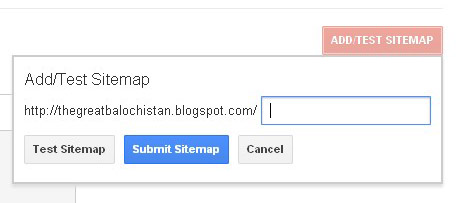
    Now Go To Optimization >> Sitemap >> Add/Test Sitemap
    Now you'll come to a page from where you need to submit Sitemap of your blog/site to the Google. Just copy any of the below code and paste that into the given box which will be same as the below image is.
    If you've posts less than 500 then copy the below code and add it into the box which appeared after clicking on "ADD/TEST SITEMAP".

    atom.xml?redirect=false&start-index=1&max-results=500


    Note: The above code is for 500 posts only, But if you've more than 500 posts then just copy the below code which is consist of two lines.


    atom.xml?redirect=false&start-index=1&max-results=500
    atom.xml?redirect=false&start-index=500&max-results=1000

    When you've chosen any of the above code according to the number of your blog's posts then just paste that into the box and click on "Submit Sitemap".
    NOW! You've done.


    Subscribe Us

    Recent comments

    Popular series

    Copyright © 2012-2014. All Rights Reserved | The Web Timeline | Designed By

    Home | Contact Us | About Us | Top